Responding to a NITAAC Revision Request
When you submit an Activity to NITAAC, the reviewer may need you to make changes to the Activity before it can be released to Contract Holders. If a revision is needed, e‑GOS sends an email to the Primary and Secondary points of contact for the Activity. In addition, the Revision Request appears in the Actions dashboard in e‑GOS when the Points of Contact log in.
To Respond to a NITAAC Revision Request
Do the following to locate the solicitation that needs revision:
In the e‑GOS Left Rail, click Actions.
Tip
The number in the Actions button is the number of unread alerts.
The Actions dashboard lists items that require your attention. An Activity that needs attention appears as <ID> Requires Revision,
Tip
<Activity Type> and <ID> change, based on your Activity.
In the list, locate the Activity that you need to revise, then click one of the following:
Order ID in the ID column
Action needed in the Action column
Open Details
Do the following to review the requested changes:
In the Review for submit to NITAAC page, at the top of the page, click See Review
The Review page lists the assigned reviewer and the items that you need to revise. Note the items that you need to revise and read the reviewer's comments. You can also read the General Comments for additional information.
Note
The items that appear in the Review page depend on the type of Activity you're creating and the reviewer's comments. Section comments only appear if the reviewer needs you to make revisions for the section. The screenshot below is a sample of what can appear. Your Review page will have different questions.
Click the buttons in the Left Rail to access specific pages in the Activity definition. Make any changes needed to address the reviewer's comments.
Note
You may need to make changes on more than one page to address the reviewer's comments.
When your changes are complete, in the Left Rail, click Submit to NITAAC.
Do the following to submit your revisions:
In the Submit to NITAAC for Approval pop-up, select the I verify that this information is accurate to the best of my knowledge checkbox.
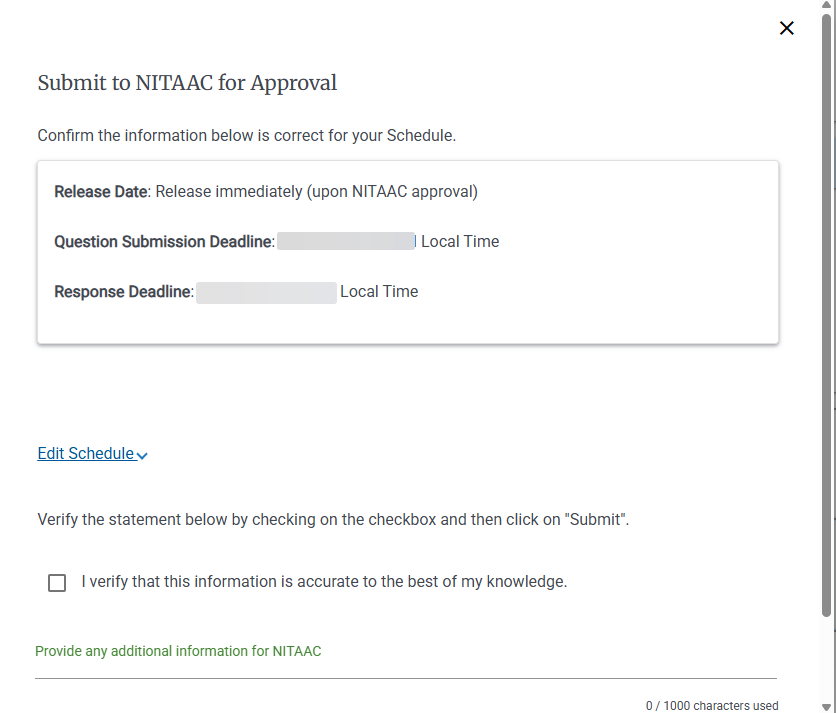
Add any additional information in the Provide any additional information for NITAAC field.
Click Submit.
In the Successfully Submitted pop-up, click Go To e‑GOS Dashboard.

