Activities (Dashboard)
The Activities Dashboard lists all of the Activities that you can view. If My Activities is selected, only Activities that you created appear in the list. If it is unselected, all Activities appear.
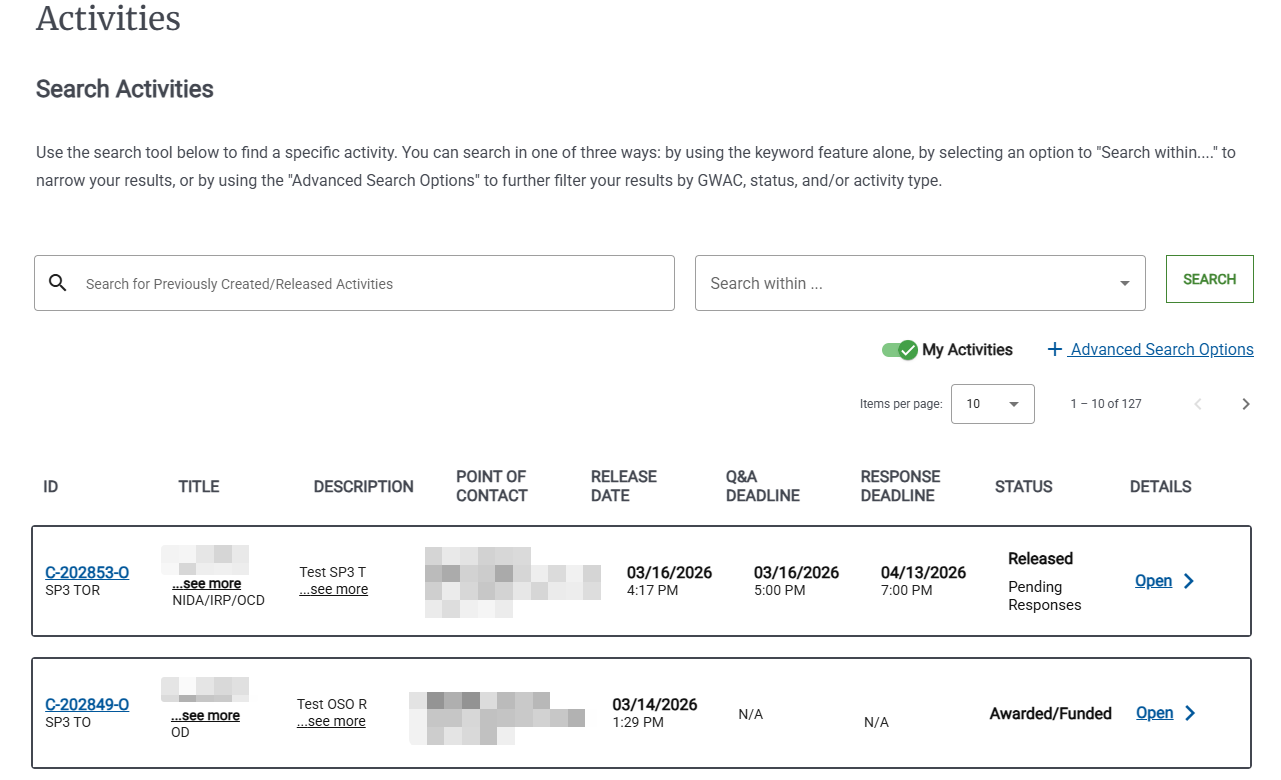
For each Activity, the dashboard lists basic information, including the following:
ID | The unique ID for the Activity in e‑GOS. The ID also lists the GWAC for the Activity. Click the Activity ID to view more information or perform any needed actions. |
Title | The Activity title. Only the first few characters of the title appear. Move the mouse pointer over see more to see the entire title. |
Description | The Activity description. Only the first few characters of the description appear. Move the mouse pointer over See more to see the entire description. |
Release Date | The date the Activity is released to Contract Holders. |
Q&A Deadline | The last date for Questions and Answers for the Activity. Not all Activities have a Q&A period; If the Activity does not include a Q&A period, the deadline appears as Not Provided. |
Response Deadline | The last date and time that Contract Holders can respond to the Activity. |
Status | The current status of the Activity. |
Details | If an Activity is fully defined, you can click Open to view more information about the Activity. |
You can click the Items per page drop-down list to control how many items appear in the list. By default, 10 items appear at a time.
You can click < to view the previous page of items or > to view the next page.
Tip
Click the header of any column in the table to sort by that column. Click again to reverse the sort order. You can only sort on a single column at a time.
An arrow pointing up in the heading for a column ( ) indicates that the table is sorted in ascending (a-z, 0-9) order on that column.
An arrow pointing down in the heading for a column ( ) indicates that the table is sorted in descending (z-a, 9-0) order on that column.
You can use the Search area in the dashboard to search for an Activity.
For more information on searching, see To Search for an Activity.
Export as CSV
When you export as a CSV file, e‑GOS exports all of the found items. You can use the search options to control which items appear in the export file.